

What if the biggest risk in an office relocation isn’t moving day, but a critical task with no clear owner? Furniture, IT equipment, employee updates, building access, and handover details all need attention. When responsibilities and deadlines are unclear, small oversights can disrupt business continuity and delay the return to work.
Planning can feel complicated, especially when teams need to keep operations running through the transition. A shared, phased plan makes the process easier to manage. This guide provides a reusable office relocation planning template to help you assign owners, set milestones, track dependencies, and prepare for potential disruptions.
You’ll find a practical framework for coordinating key workstreams, from inventory and employee communication to IT readiness and final checks. It also explains how a commercial relocation partner such as Vision Movers may support packing and transport, while your internal team remains responsible for business decisions and technical readiness. Clear ownership and preparation help you manage the transition and limit avoidable disruption.
Key Takeaways
- Use an office relocation plan as a shared document for scope, responsibilities, dates, dependencies, and approvals.
- Separate company decisions from logistics tasks, then assign an owner and target date to each task.
- Compare a single move with a phased sequence based on team needs, equipment dependencies, and acceptable interruption.
- Track preparation, packing readiness, move-day coordination, and post-move review with clear status and sign-off fields.
- Brief a relocation provider with your inventory, priorities, and open questions, and confirm service inclusions and responsibilities directly.
Office Relocation Planning: Define the Move Before Tasks Begin
An office move combines operational decisions with physical relocation tasks. Your team must decide what the new workplace needs, which business functions take priority, and who can approve changes. Furniture, equipment, records, and other assets also need to be inventoried and prepared. Starting with a clear brief keeps these decisions connected and gives each workstream a common reference.
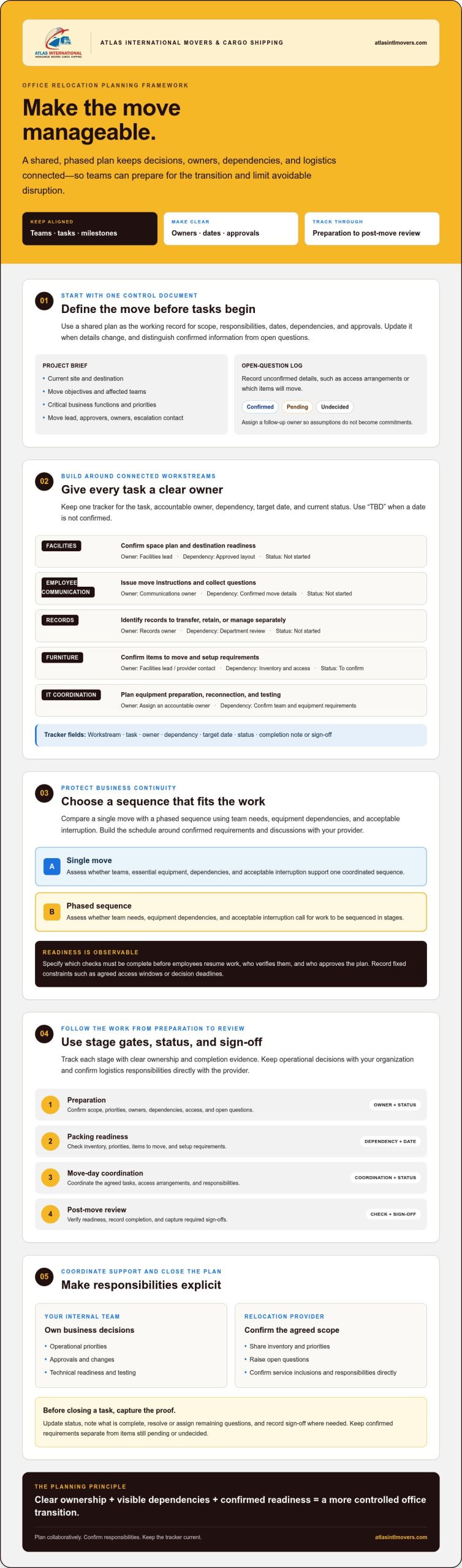
Use a shared planning document to record the move’s scope, owners, target dates, dependencies, and approvals. An office relocation plan is the control document that links teams, tasks, and milestones so decisions and logistics stay aligned. Treat it as a working record: update it when details change, and distinguish confirmed information from questions that still need answers.
For a practical overview of planning and execution, watch this video:
What Should an Office Relocation Brief Include?
Begin with a concise project brief that gives every workstream the same reference point. Record the current site and destination, the move objectives, affected teams, critical business functions, and operational priorities. Then name the move lead, approvers, workstream owners, and escalation contact so it’s clear who coordinates tasks, makes decisions, and resolves issues.
Keep a separate list of open questions, such as unconfirmed access arrangements or which items will move. Mark each item as confirmed, pending, or undecided, and assign someone to follow up. This prevents assumptions from quietly becoming commitments.
How to Set Priorities Before Building the Schedule
Identify which operations, equipment, records, and employee services must remain available during the transition. Map the dependencies between them. For example, a team’s return to work may depend on essential equipment being placed and tested. Record fixed constraints, such as agreed access windows or decision deadlines, but don’t assume a standard move duration. Build the schedule around confirmed requirements and discussions with your provider.
Define readiness in observable terms: which checks must be complete before employees resume work, who verifies them, and who approves the plan. This gives the team a shared basis for resolving gaps before they affect the transition.
Once the brief is agreed, it can also help frame discussions with a logistics partner. Atlas International Movers & Cargo Shipping provides corporate relocation support. Confirm the required scope and responsibilities directly with the provider. Your organization retains ownership of operational priorities and approvals.
Build an Office Relocation Plan Around Connected Workstreams
A reliable office relocation plan connects work that often sits with different teams. Use one tracker to show each workstream’s task, accountable owner, dependency, target date, and current status. Keep company decisions, such as what the new workplace needs, separate from logistics tasks that may be assigned to a relocation provider. Confirm the requested scope and responsibilities with the provider instead of assuming they are included.
Use “TBD” for dates that aren’t confirmed, and update each status as work progresses. A dependency shows what must happen first. For example, furniture setup may depend on destination access being confirmed. Add a completion note or sign-off field when a task needs evidence that it is finished.
| Workstream | Task | Owner | Dependency | Target date | Status |
|---|---|---|---|---|---|
| Facilities | Confirm space plan and destination readiness | Facilities lead | Approved layout | TBD | Not started |
| Employee communication | Issue move instructions and collect questions | Communications owner | Confirmed move details | TBD | Not started |
| Records | Identify records to transfer, retain, or manage separately | Records owner | Department review | TBD | Not started |
| Furniture | Confirm items to move and setup requirements | Facilities lead / provider contact | Inventory and access | TBD | To confirm |
| IT coordination | Plan equipment preparation, reconnection, and testing | Internal IT owner | Equipment list and destination readiness | TBD | Not started |
| Operational continuity | Set priority functions and readiness checks | Business lead | Team and IT plans | TBD | Not started |
Coordinate Facilities, Furniture, and Workplace Readiness
Keep space planning, furniture decisions, access arrangements, and destination readiness as distinct tasks, each with a named owner. Assign someone to confirm the current premises are ready for handover and another person to confirm the destination is ready to receive staff and assets. List furniture assembly or setup needs, then confirm directly with the provider whether those tasks are within the agreed scope.
Plan IT and Employee Workstreams Without Overlap
The internal IT owner should direct equipment preparation, reconnection, and testing, while the communications owner manages employee notices, instructions, and questions. A relocation provider may support agreed packing and movement of furniture or IT equipment, but don’t assign network management, systems administration, or technical configuration to the moving team. For deeper technical planning, refer to the article’s dedicated IT infrastructure relocation guide.
Keep technical decisions with the internal owners who understand the company’s systems and requirements. They can coordinate testing around the agreed move sequence and flag equipment dependencies that affect team readiness. Clear task boundaries help prevent duplicated work or gaps between internal planning and external logistics support.
To understand where a provider may fit into your workstreams, review Atlas’s corporate relocation support and confirm specific inclusions directly.
Protect Business Continuity: Compare Office Relocation Sequencing Options
Choosing how to sequence a move is an operational decision, not a universal rule. A single coordinated move may suit teams whose work and equipment need to be together. A phased move may fit functions that can transfer independently while others continue operating. Compare each option against business priorities, equipment dependencies, and the level of interruption leaders consider acceptable.
Move sequencing should follow operational dependencies, not convenience alone. Before choosing an approach, identify which teams rely on shared systems, spaces, records, or equipment. Then ask whether separating those resources, even temporarily, would affect customer service or essential work.
When Might a Phased Office Move Fit Better?
Consider a phased sequence when teams use different spaces or equipment and can work separately during the transition. Staging can create its own risks: colleagues may be split across sites, shared tools may be unavailable to one group, or handoffs may become harder. Ask each affected function leader to review the proposed sequence, identify any resource conflicts, and approve the interruption it could create.
How to Record Continuity Risks and Contingencies
Log each significant concern with its likelihood, operational impact, owner, and response. A useful fallback states what the team will do if a destination area isn’t ready or equipment needs additional attention. Keep the action specific and assign a decision-maker, rather than relying on a general instruction to “resolve the issue.”
| Option or risk | Operational impact | Dependencies | Owner | Fallback action |
|---|---|---|---|---|
| Single coordinated move | Several functions may be unavailable during the same transition window | Destination readiness; shared equipment; agreed access | Move lead | Confirm a revised readiness decision before releasing teams to resume work |
| Phased move | Teams may be separated, or shared resources may be harder to access | Team handoffs; equipment sequence; space availability | Relevant function leaders | Adjust the order or keep essential work with the team that needs it |
| Delayed destination readiness | A team may not be able to use its assigned space | Facilities sign-off; access; furniture placement | Facilities owner | Escalate the readiness gap and agree on a temporary operating arrangement |
| Equipment needs further attention | A dependent task may not be ready to resume | Internal IT checks; equipment handover | Internal IT owner | Follow the business’s approved continuity process and reassess readiness |
Use the matrix to compare scenarios, then document the chosen sequence, unresolved risks, and approval from accountable leaders. The goal is a controlled transition with minimal disruption and downtime, not a promise that work will continue without interruption. If external logistics support is part of your assessment, review Atlas’s corporate relocation service and confirm scope and responsibilities directly with the provider.
Use This Office Relocation Checklist from Preparation to Move-Day Review
A checklist turns the plan into trackable actions. Give every task an owner, due date, status, and evidence or sign-off field. Use “pending” when details aren’t confirmed, and close a task only when its owner verifies completion or records a follow-up.
Preparation
- Confirm scope and inventory. Owner: move lead. Due date: [date]. Status: [status]. Evidence/sign-off: approved scope and current inventory.
- Issue employee instructions. Owner: communications lead. Due date: [date]. Status: [status]. Evidence/sign-off: notice sent and questions assigned for response.
- Confirm destination readiness and access arrangements. Owner: facilities lead. Due date: [date]. Status: [status]. Evidence/sign-off: readiness confirmation from the responsible internal owner.
Packing Readiness
- Confirm packing responsibilities against the agreed scope. Owner: move lead and provider contact. Due date: [date]. Status: [status]. Evidence/sign-off: confirmed task allocation.
- Flag sensitive, fragile, or business-critical items. Owner: department leads. Due date: [date]. Status: [status]. Evidence/sign-off: marked inventory and handling requirements shared with the appropriate contact.
- Check outstanding decisions and access details. Owner: facilities lead. Due date: [date]. Status: [status]. Evidence/sign-off: open items resolved or assigned a follow-up owner.
Move-Day Coordination
- Track handovers against the inventory. Owner: designated inventory lead. Due date: move day. Status: [status]. Evidence/sign-off: completed handover record, with discrepancies reported to an assigned owner.
- Confirm furniture placement. Owner: facilities lead. Due date: [date]. Status: [status]. Evidence/sign-off: placement checked against the approved layout; confirm any provider setup responsibilities in advance.
- Record issues and decisions. Owner: move lead. Due date: move day. Status: [status]. Evidence/sign-off: issue log with the decision-maker and next action noted.
Post-Move Review
- Test equipment and relevant systems. Owner: internal IT lead. Due date: [date]. Status: [status]. Evidence/sign-off: test results or a follow-up assigned. Keep technical testing with your internal IT team.
- Check employee readiness and remaining items. Owner: department leads. Due date: [date]. Status: [status]. Evidence/sign-off: reported gaps and resolution owner.
Set each due date according to your agreed schedule, not an assumed standard duration. For more on planning continuity and reducing disruption, see the article’s business-continuity guidance. Clear ownership and readiness checks help teams identify gaps and agree on next steps.
If you’re assessing external logistics support, review Atlas’s corporate relocation service and confirm the specific scope and responsibilities directly with the provider.
Coordinate Office Relocation Support and Close the Plan with Clear Sign-Offs
Once your internal plan is organized, use it to brief a potential relocation provider. A clear handover helps both sides identify the requested support, decisions that remain with your business, and details that still need confirmation. For more context on the wider process, see Atlas’s corporate relocation planning guide.
How to Brief a Relocation Provider
Share the move scope, current inventory, business priorities, access considerations, requested support, and the names of decision-makers and day-to-day contacts. Include open questions rather than presenting unconfirmed details as agreed. For example, identify furniture or IT equipment that may need special handling, then ask what arrangements are available and who is responsible for each task.
Ask the provider to confirm proposed responsibilities, assumptions, dependencies, and unresolved details in writing. Review the response with your internal workstream owners before adding it to the plan. Confirm any specific packing, transport, or setup inclusions directly. Consider storage only if your move requires a temporary or longer-term holding solution, and clarify the relevant scope before making arrangements; commercial removal specialists such as letsmovelondon.co.uk illustrate how integrated moving and storage services can be scheduled.
What to Sign Off Before and After the Move
Before work proceeds, obtain internal approval for the scope, move sequence, assigned responsibilities, and contingency decisions. Keep a record of who approved each item and when. This gives the move lead a reliable reference if plans change or a decision needs to be revisited.
After the move, record completion of inventory checks, destination setup, and each assigned readiness review. The responsible person should sign off only after checking the result. If something remains incomplete, record the issue, follow-up owner, and next action rather than marking it done. Your organization retains responsibility for operational readiness and business decisions; an external relocation team can support only the tasks agreed with the provider.
This final review connects the original plan with the workplace in use. Atlas provides corporate relocation support, and our team can discuss how agreed logistics support may fit your plan. Review our corporate relocation information to learn more.
Put Your Office Move Plan into Action
A well-managed office relocation starts with clear ownership. Use one shared plan to connect tasks, dependencies, deadlines, and approvals, then choose a move sequence that reflects your teams’ operational needs. A staged checklist helps track preparation, handovers, equipment testing, and final readiness without leaving completion to assumption.
External logistics support can help coordinate agreed moving tasks, while your internal team remains responsible for business priorities and operational decisions. Atlas provides corporate relocation and storage solutions. Confirm the specific scope and responsibilities directly with our team.
Discuss your corporate relocation requirements with our team and explore how support may fit your plan. With clear decisions, accountable owners, and practical sign-offs, you can approach the transition with greater confidence and prepare your people to settle into the new workplace.
Frequently Asked Questions
What should an office relocation plan include?
An office relocation plan should connect the move’s scope, priorities, tasks, owners, dependencies, target dates, risks, and approvals in one shared document. Include affected teams, critical business functions, furniture and equipment inventory, employee communication, facilities readiness, and provider responsibilities. Separate confirmed details from open questions, and record who will resolve each uncertainty. This gives internal decision-makers and any relocation provider a consistent reference throughout preparation, the move, and post-move review.
How do you create an office relocation checklist?
Build the checklist in stages: preparation, packing readiness, move-day coordination, and post-move review. For each task, record an owner, due date, status, and evidence or sign-off. Include specific checks such as confirming the inventory, sharing employee instructions, verifying destination readiness, tracking handovers, and assigning IT testing. Keep incomplete items visible, with a follow-up owner and next action. Close a task only after the responsible person confirms completion or records what remains to be done.
How can a business minimize disruption and downtime during an office move?
Reduce avoidable disruption by identifying essential business functions and their dependencies before choosing a move sequence. Assign owners to facilities, employee communication, inventory, and equipment readiness, then agree on contingency actions for delays or unresolved issues. Your internal IT team should own technical preparation and testing. A relocation provider may support agreed logistics tasks, but confirm its scope directly. Set clear readiness checks and have accountable business leaders approve when teams can resume their work.
When should a business start planning an office relocation?
Start planning as soon as the business begins defining the move, rather than waiting until physical tasks are ready to begin. Early coordination gives decision-makers time to confirm the destination, scope, affected teams, business priorities, responsibilities, and dependencies. The schedule should reflect the move’s complexity and any fixed constraints, not an assumed standard duration. If key details are still open, assign owners to resolve them and show their status in the shared plan before treating them as commitments.
How should a company move IT equipment to a new office?
Have an internal IT owner create an equipment inventory and plan preparation, disconnection, reconnection, and testing. Identify sensitive or business-critical items and agree in advance how they’ll be handled. Confirm with the relocation provider whether packing or moving specific equipment is within the agreed scope. Keep network management, system configuration, backups, and technical testing under the responsibility of the company’s IT team or its designated technical support, not the moving team.
Should an office move happen all at once or in phases?
Choose the sequence that best fits the business’s teams, equipment dependencies, and acceptable interruption. A single coordinated move may suit functions that rely on shared spaces or resources. A phased move may work if teams can transfer separately, but it can also temporarily divide colleagues or limit access to shared tools. Compare both options against operational impact, identify fallback actions, and obtain approval from the leaders accountable for each affected business function.
What should a business check after an office relocation?
After the move, compare delivered items with the inventory and report discrepancies to the assigned owner. Confirm furniture placement against the approved layout, and have the internal IT owner oversee equipment testing. Ask department leads to check employee readiness and whether essential work can resume. Record any outstanding issue with a responsible person and next action. Keep sign-offs for completed checks, and don’t mark an item complete until its owner has verified the result.